
Accessibility Tools

FREE

Join the BigFreq community and get BigFuzz, our 4-band multiband distortion

Plugin · Drum machine and instrument sampler

Sonic Forge

Drums and instruments, forged from the Vault.

Sonic Forge is a 32-pad drum machine and a full instrument sampler in one plugin. Load a kit, shape every pad with its own effects chain, sequence it, and route it to separate outputs. Switch to Instrument mode and play multi-sampled keys, synths and more with a complete synth engine on top.

€59 on its own, or inside the Sonic Suite for €17.99 a month. Ways to own
Try Sonic Forge free for 30 days.

VST3 / AU / StandaloneWindows / macOSVersion 1.0
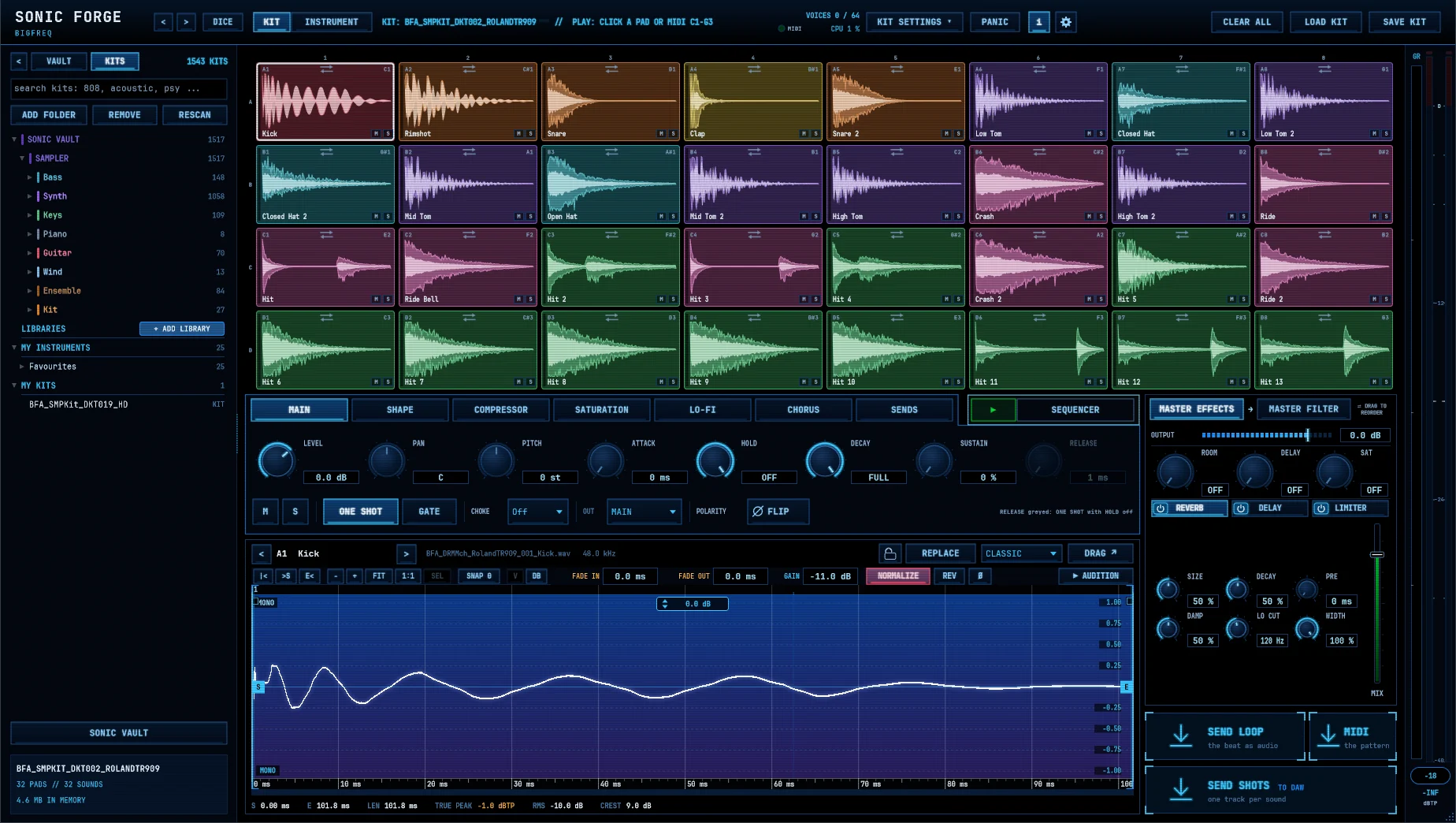
Sonic Forge kit view with the kit browser, 32 pads, pad editor, sequencer and master section
Inside the plugin

A drum machine and a sampler. One plugin.

Every pad is its own channel with its own effects, and Instrument mode turns the same plugin into a multi-sampled instrument with a full synth engine.

Sonic Forge: kit and instrument in one, with numbered markers
Top bar

Kit and instrument in one

Switch modes, load and save kits, and keep an eye on the engine from the top bar.

  1. Dice Randomise the kit for instant new ideas.
  2. Kit / Instrument Switch between the 32-pad drum machine and the instrument sampler.
  3. Loaded kit The kit that is loaded now.
  4. Voices, CPU and MIDI Live engine status.
  5. Kit settings Kit-wide options in one menu.
  6. Panic Stop all sound instantly.
  7. MIDI in In your DAW, the MIDI channel the pads listen to (all or 1 to 16, saved with the project). In the standalone app, the MIDI input.
  8. Clear All, Load Kit, Save Kit Kit management.
  9. Settings The cog opens the plug-in settings, including UI size.
  10. Licence The badge shows your licence or trial status.
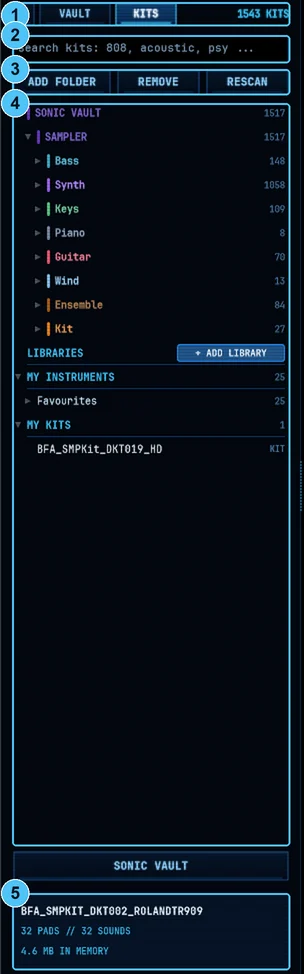
Sonic Forge: kits and sounds, vault and your own, with numbered markers
Kit browser

Kits and sounds, Vault and your own

Switch between single sounds and complete kits, and use your own kit folders next to the Vault.

  1. Vault / Kits Switch between single sounds and complete kits, with the kit count.
  2. Search Find kits by name, machine or style.
  3. Add Folder, Remove, Rescan Use your own kit folders next to the Vault.
  4. Kit tree Kits and instruments organised by category, with favourites.
  5. Kit info Pads, sounds, memory used and load time.
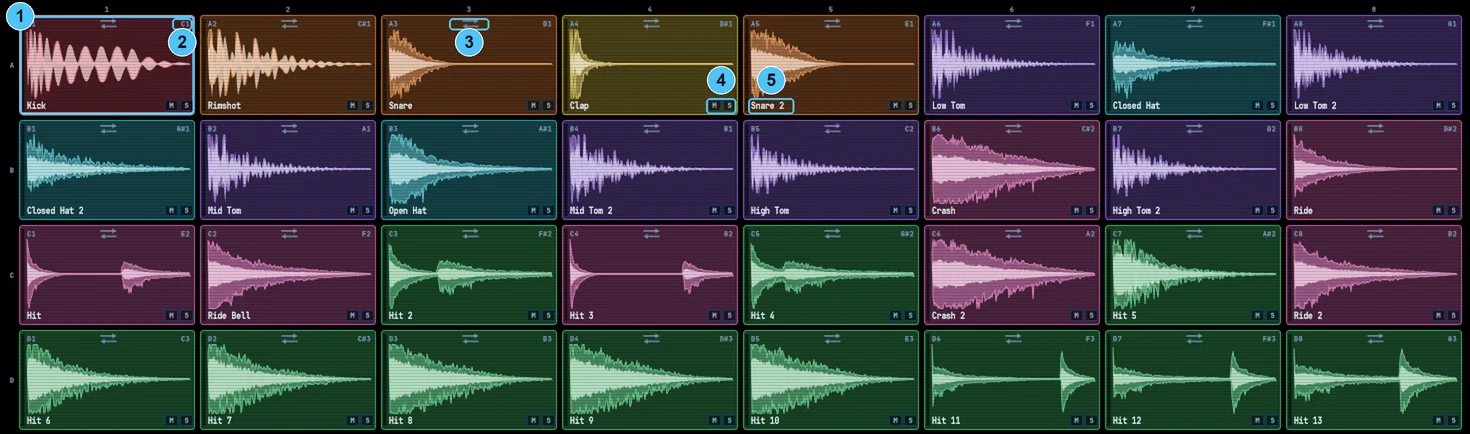
Sonic Forge: 32 pads, every one under control, with numbered markers
Pads

32 pads, every one under control

A 4 x 8 grid with waveforms, colours by sound type, and mute and solo on every pad.

  1. Pad Waveform, colour by sound type, and the selected pad highlighted.
  2. Note The MIDI note each pad responds to.
  3. Swap Step through alternative sounds for this pad.
  4. Mute / Solo On every pad.
  5. Name Rename any pad.
Sonic Forge: every pad is its own channel, with numbered markers
Per pad

Every pad is its own channel

Seven effect pages, an envelope, choke groups and its own output on every pad.

  1. Effect tabs Main, Shape, Compressor, Saturation, Lo-Fi, Chorus and Sends on every pad.
  2. Main Level, pan, pitch, attack, hold, decay, sustain and release.
  3. Mute, Solo, One Shot With the pad's trigger mode.
  4. Gate, Choke, Output Gate playback, choke groups (closed hat chokes open hat), and routing to separate outputs.
  5. Polarity flip Fix phase between layered sounds.
  6. Sequencer Built in, with DAW sync.
  7. Kit effects One Compressor, Lo-Fi and Chorus on the whole kit. Set the target on each of those tabs to KIT or to a single pad.
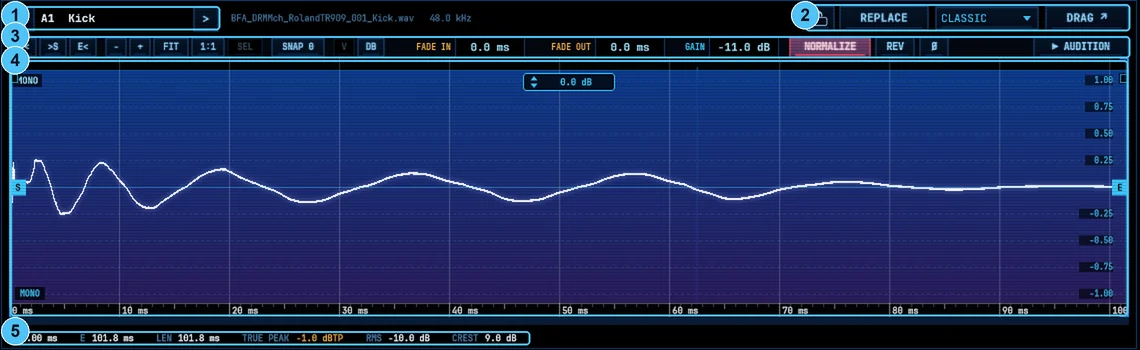
Sonic Forge: trim, fade and replace without leaving the pad, with numbered markers
Sample editor

Trim, fade and replace without leaving the pad

Edit the sound on any pad, swap it for another, or drag it out to your DAW.

  1. Pad navigation Step through pads without leaving the editor.
  2. Lock, Replace, stretch mode, Drag Swap a pad's sound or drag it out to your DAW.
  3. Tools Start/end, zoom, fit, snap, fade in and out, gain, normalise, reverse, polarity, audition.
  4. Waveform With start and end markers and a gain handle.
  5. Analysis Start, end, length, true peak, RMS and crest factor.
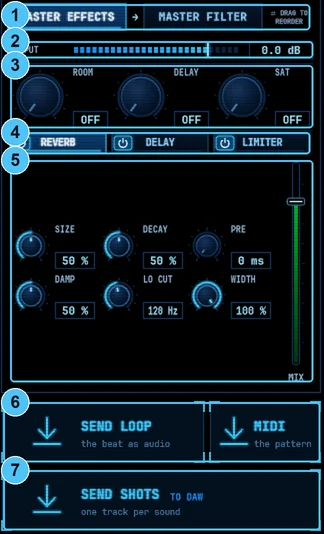
Sonic Forge: glue the kit, then send it out, with numbered markers
Master and export

Glue the kit, then send it out

Kit-wide sends and master effects in a chain you reorder by dragging, then send the beat to your DAW.

  1. Master effects and master filter Drag to reorder the chain.
  2. Output level Final level for the kit.
  3. Room, Delay, Sat sends Kit-wide send effects.
  4. Reverb, Delay, Limiter Each with its own page and on/off.
  5. Reverb controls Size, decay, pre-delay, damping, low cut, width and mix.
  6. Send Loop Drag the beat as audio, or use the MIDI tile to drag the pattern out as a .mid file.
  7. Send Shots Send every pad to the DAW, one track per sound.
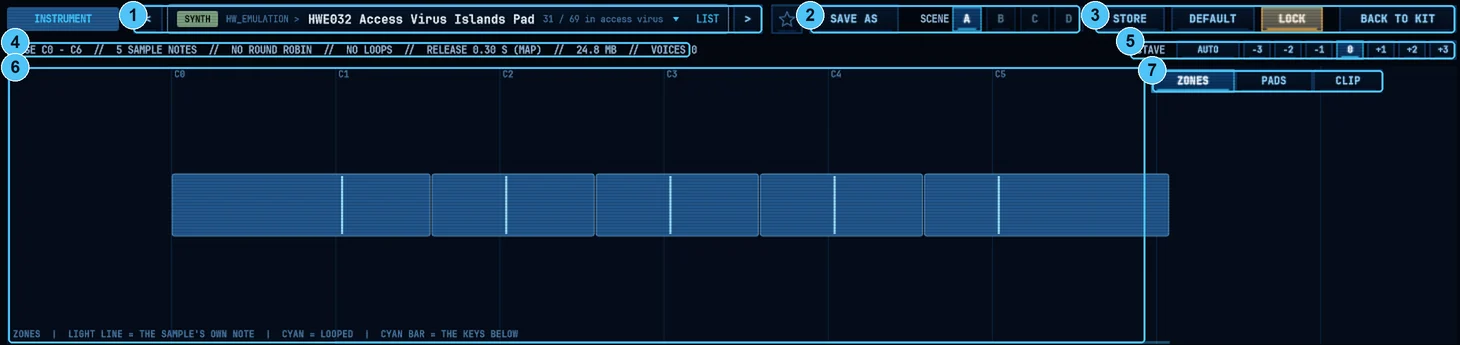
Sonic Forge instrument modeSonic Forge: a full sampler for multi-sampled instruments, with numbered markers
Instrument mode

A full sampler for multi-sampled instruments

Instrument mode plays keys, synths, bass, piano, guitar and more from the Vault, including hardware synth emulations.

  1. Instrument browser Step through instruments by category, or open the list.
  2. Save As and Scenes A-D Four snapshots per instrument.
  3. Store, Default, Lock, Back to Kit Manage the instrument and jump back to the drum kit.
  4. Instrument info Range, sample notes, round robin, loops, release, size and active voices.
  5. Octave Auto or manual shift.
  6. Zone map See every sample zone, round robin layers stacked.
  7. Zones, Pads, Clip views Three ways to see the instrument.
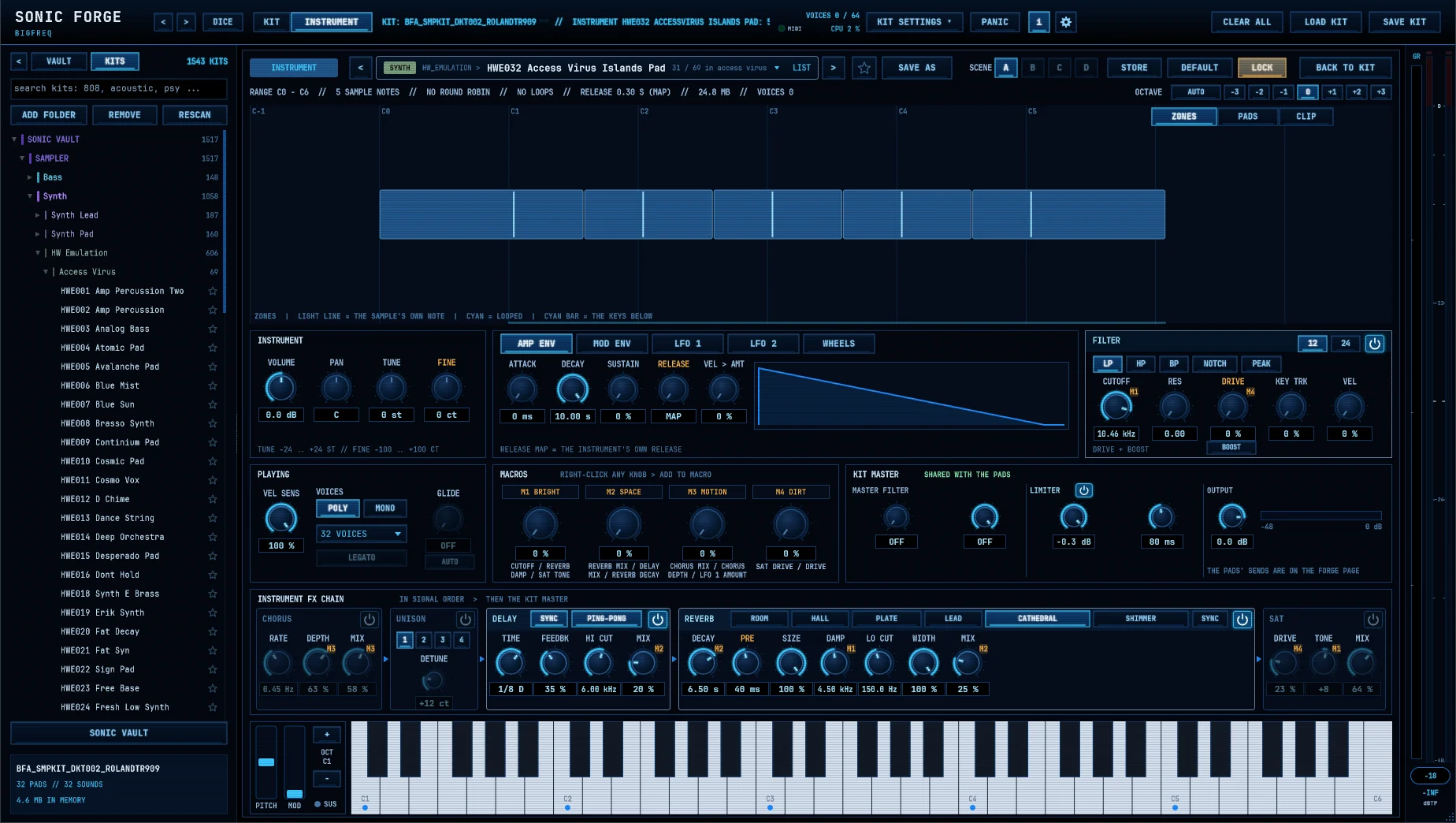
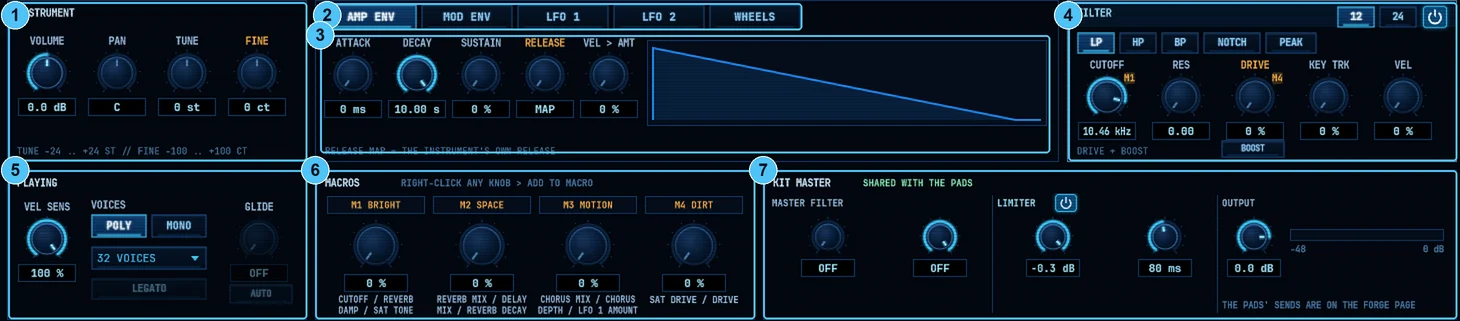
Sonic Forge: a complete synth on top of every instrument, with numbered markers
Synth engine

A complete synth on top of every instrument

Envelopes, LFOs, a multimode filter and four macros on every instrument.

  1. Instrument Volume, pan, tune and fine tune.
  2. Modulation tabs Amp envelope, mod envelope, LFO 1, LFO 2 and wheels.
  3. Envelope Attack, decay, sustain, release (or the instrument's own release) and velocity amount.
  4. Filter LP, HP, BP, notch and peak, 12 or 24 dB, with cutoff, resonance, drive with boost, key tracking and velocity.
  5. Playing Velocity sensitivity, poly or mono, up to 64 voices (32 by default), glide and legato.
  6. Macros Four macros (Bright, Space, Motion, Dirt). Right-click any knob to add it to a macro.
  7. Kit master Master filter, limiter and output, shared with the pads.
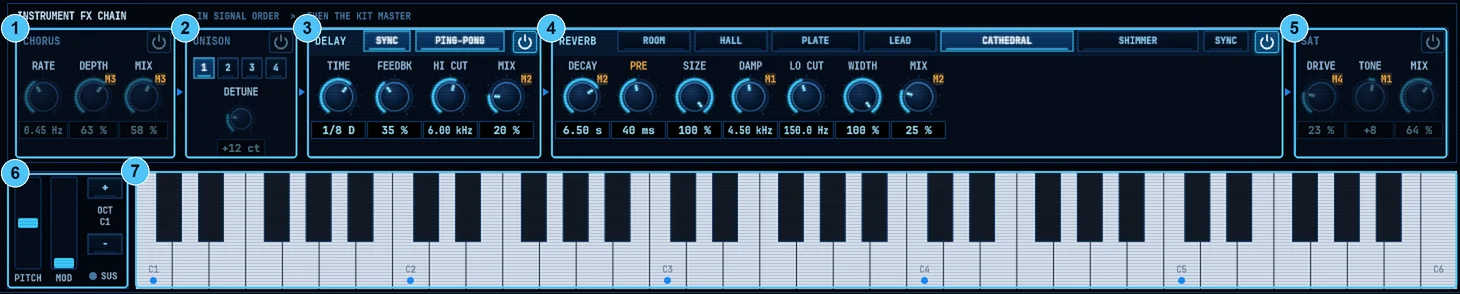
Sonic Forge: effects built for instruments, with numbered markers
Instrument FX

Effects built for instruments

Chorus, unison, delay, six reverbs and saturation, plus wheels and an on-screen keyboard.

  1. Chorus Rate, depth, mix.
  2. Unison 1 to 4 voices with detune.
  3. Delay Synced or free, ping-pong, feedback, high cut.
  4. Reverb Room, Hall, Plate, Lead, Cathedral and Shimmer, with full controls.
  5. Saturation Drive, tone, mix.
  6. Pitch and mod wheels With octave shift.
  7. On-screen keyboard Play without a controller.
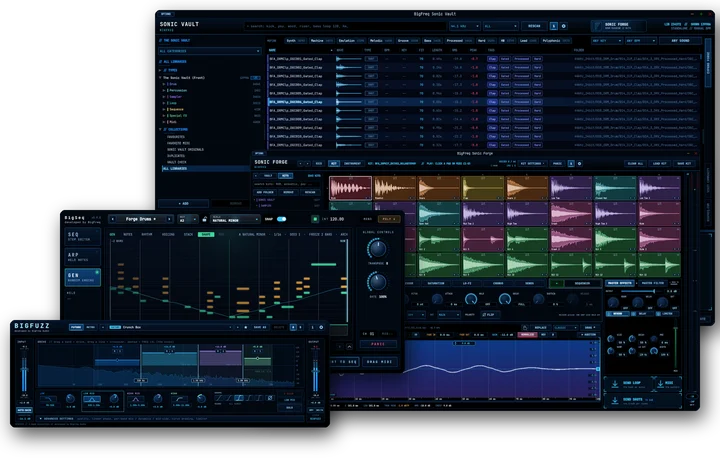
The BigFreq Sonic Suite: Sonic Vault, Sonic Forge, BigSeq and BigFuzz
Better together

Works with the Sonic Vault

Build kits in the Sonic Vault, then hit Push to Forge to open them here with multi-output routing and the full engine. Sonic Forge also stands on its own as a drum machine and sampler.

Pricing and ways to own

Own it today, or own it for €17.99 a month.

Sonic Forge is part of the Sonic Suite. Own the whole Suite for €17.99 a month, yours to keep after 9 payments, or buy outright: Sonic Forge on its own, or the whole Suite for €149.99.

Rent to own

Sonic Suite plan

Sonic Forge comes with every plugin in the Suite.

€17.99/month, yours after 9 payments
  • Sonic Vault Pro, Sonic Forge and BigSeq
  • Yours to keep after 9 payments
  • Cancel anytime
  • One BigFreq licence for every plugin
  • Cancel before payment 9: the plugins go back to the free Sonic Vault Basic tier.
  • Rejoin within 12 months and the payments you made still count toward ownership.
Start the plan
Buy outright

Pay once, own it

€59one timeOne-time purchase, yours to keep
  • 32-pad drum machine and instrument sampler
  • Per-pad effects, sequencer, multi-output
  • Instrument mode with the full synth engine
Buy Sonic Forge
€149.99one time
  • Sonic Vault Pro, Sonic Forge and BigSeq, yours today
  • One payment, nothing more to pay
  • One BigFreq licence for every plugin
Buy the Sonic Suite

Cancel the plan anytime. Plugins you own stay yours.

Want to try the Forge first? The Forge tab inside Sonic Vault Pro has a 30-day trial.Prices in EUR. Secure checkout by Moonbase.
At a glance

Specs

Plugin type
Drum machine and instrument sampler
Pads
32 (4 x 8)
Per pad
AHDSR, pitch, pan, choke, gate/one shot, polarity, 7 effect pages
Outputs
8 stereo + 8 mono (24 channels)
Sequencer
Pitch, velocity, gate, draw and stutter lanes, DAW sync
Instrument engine
Zones, round robin, 2 envelopes, 2 LFOs, multimode filter, 4 macros, up to 64 voices (32 by default)
Instrument FX
Chorus, unison, delay, reverb (6 types), saturation
Master
Room, delay and saturation sends, reverb, delay, limiter, master filter
Export
Drag loop, one track per pad
Formats
VST3, AU (macOS) and standalone
Platforms
Windows 10 and 11 (64-bit), macOS 15 Sequoia or later (Apple Silicon and Intel)
Version
1.0, release planned for 15 January 2027
01 / Download

Download Sonic Forge

Buy Sonic Forge or the Sonic Suite and your licence and download link arrive by email right after checkout. The installers stay in your BigFreq account, and you join the free BigFreq community.

Windows

VST3
  • Windows 10 and 11, 64-bit
  • Any VST3 host
  • Version 1.0
Get Sonic Forge

macOS

VST3 · AU
  • macOS 15 Sequoia or later, Apple Silicon and Intel
  • Any VST3 or Audio Units host, Logic Pro included
  • Version 1.0
Get Sonic Forge
02 / Release history

Release notes

What changed in each version: new features, fixes and known issues.

1.0First release
Planned for 15 January 2027
  • New32 pads (4 x 8), each with AHDSR, pitch, pan, choke, gate or one shot, polarity and 7 effect pages.
  • NewMulti-output routing: 8 stereo and 8 mono outputs (24 channels).
  • NewSequencer with pitch, velocity, gate, draw and stutter lanes, synced to your DAW.
  • NewInstrument engine: zones, round robin, 2 envelopes, 2 LFOs, a multimode filter, 4 macros and up to 64 voices (32 by default).
  • NewMaster section with room, delay and saturation sends, reverb, delay, limiter and master filter.
  • New10 Roland drum machine kits included.
  • NewKit effects: one Compressor, Lo-Fi and Chorus across the whole kit.
  • NewDrag a loop to your DAW, one track per pad. VST3, AU (macOS) and standalone.
03 / Installation and help

Install and help

Do I need the Sonic Vault to use Sonic Forge?

No. Sonic Forge works on its own with its kits and your own folders. With the Sonic Vault, you get Push to Forge and the full library. It comes with 10 Roland drum machine kits.

Can I load my own samples?

Yes. Add any folder in the kit browser, or replace any pad's sound.

Is there a trial?

Try Sonic Forge free for 30 days.

Does it work with multi-output in my DAW?

Yes. Route pads to separate outputs from each pad's OUT setting.

Rent to own or buy outright?

Own the full Sonic Suite for €17.99 a month. Yours to keep after 9 payments. Cancel anytime. Or own it today for €149.99. Or buy Sonic Forge on its own for €59.

How do I install it?

Run the installer for your system, restart your DAW and rescan plugins if needed. Windows: the VST3 goes to C:\Program Files\Common Files\VST3\BigFreq\ and the standalone app to C:\Program Files\BigFreq\. macOS: VST3 in /Library/Audio/Plug-Ins/VST3, AU in /Library/Audio/Plug-Ins/Components and the standalone app in /Applications/BigFreq.

Reports are stored privately and read only by the BigFreq team. Your email is optional and used only to reply about this report.

Get Sonic Forge

Or get the whole Sonic Suite: Sonic Vault Pro, Sonic Forge and BigSeq, for €17.99 a month, yours to keep after 9 payments.