
Accessibility Tools

FREE

Join the BigFreq community and get BigFuzz, our 4-band multiband distortion

Flagship plugin · Sample library manager with a built-in drum machine

Sonic Vault

Your whole sample library. One window. Straight to the beat.

The Sonic Vault is where you find, audition, shape and build with every sound you own. Browse the BigFreq Vault and your own libraries side by side, filter by key, BPM and tags, preview in time with your track, then slice, kit and drag to your DAW without leaving the plugin.

Pro €99 one-time, or inside the Sonic Suite for €17.99 a month. Ways to own

VST3 / AU / StandaloneWindows / macOSVersion 1.0
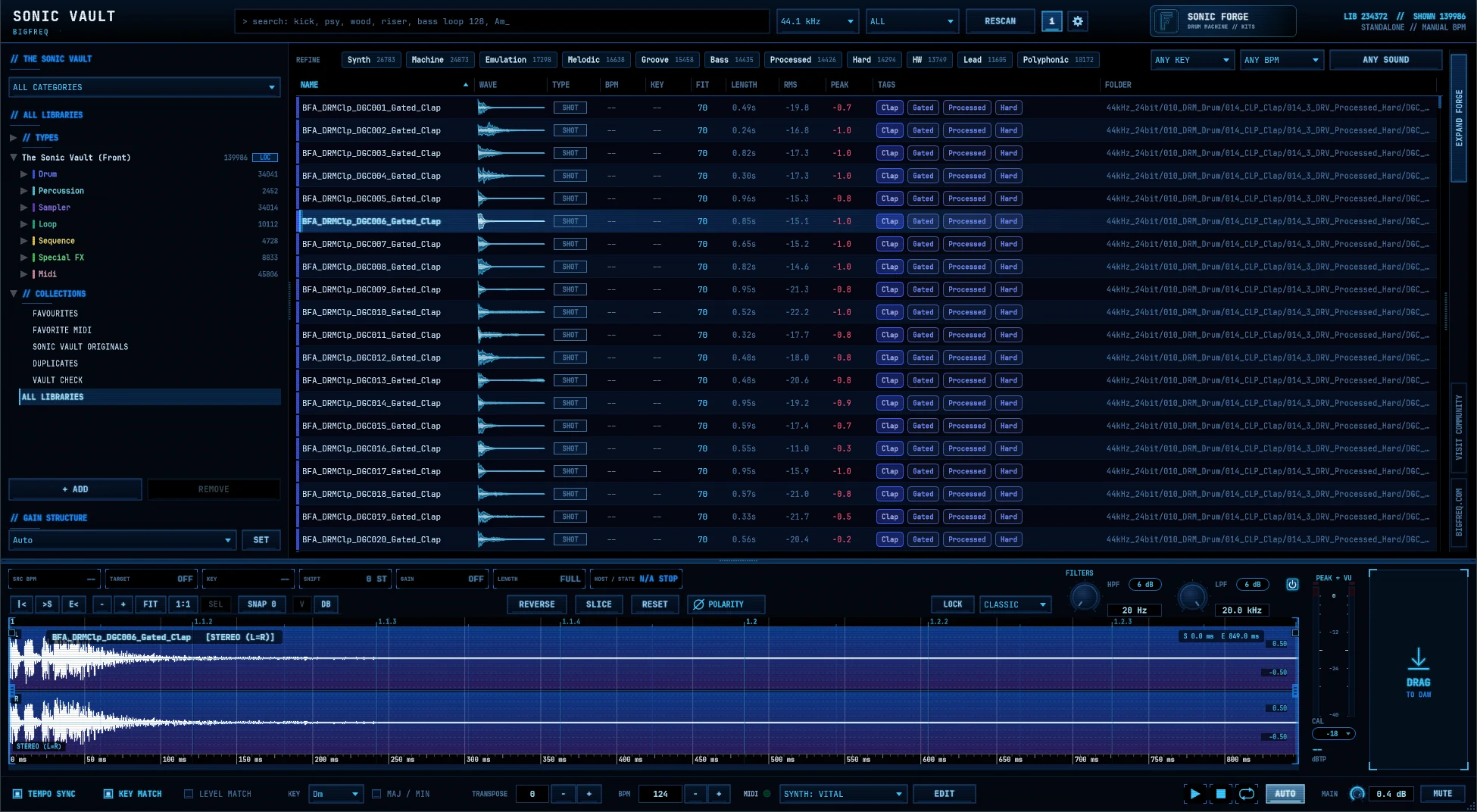
Sonic Vault with the library tree, sample browser, preview editor and Mini Forge
Inside the plugin

Every sound you own, already in your key.

Stop scrolling file names. Every sound comes analysed, so the Vault finds what fits your track and plays it in time, in key and at the right level.

Sonic Vault: search everything, from one bar, with numbered markers
Command bar

Search everything, from one bar

The command bar runs the whole Vault: search, sample rate, rescans, your tier and the way into the full drum machine.

  1. Search Type anything: sound type, genre, character, BPM or key. Results update as you type.
  2. Sample rate Switch the library between 44.1 and 48 kHz.
  3. Scope filter Show everything, or only loops, only one-shots or only MIDI patterns.
  4. Rescan Pick up new files in your libraries.
  5. Pro status See your tier at a glance.
  6. Sonic Forge Open the full drum machine.
  7. Library stats and host sync Total sounds, sounds shown, and the host tempo the Vault is following.
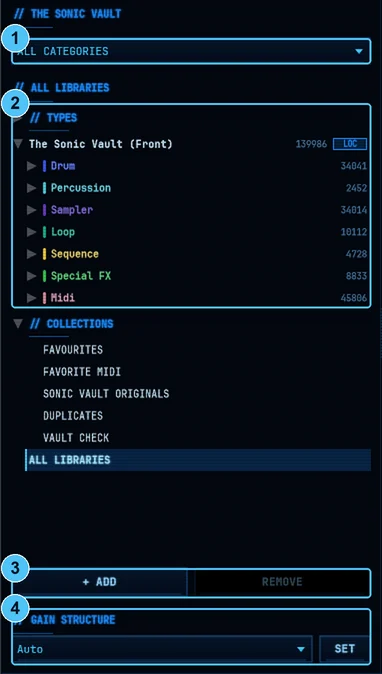
Sonic Vault: one tree for the vault and your own sounds, with numbered markers
Library

One tree for the Vault and your own sounds

The Sonic Vault and your own sample folders live in one tree, with live counts on every folder.

  1. Categories Narrow the whole browser to one category in one click.
  2. Library tree Drill from Drum to Kick to a style like Techno Hard or House Progressive.
  3. Add and remove libraries Bring in your own sample folders alongside the Vault.
  4. Gain structure Pro: set where sounds peak after Level Match. Auto gives each sound type its own target (kicks at -12 dBTP, hats at -16 dBTP and so on), or pick one fixed level from -6 to -24 dBTP for everything.
Sonic Vault: sort by what matters, not by file name, with numbered markers
Browser

Sort by what matters, not by file name

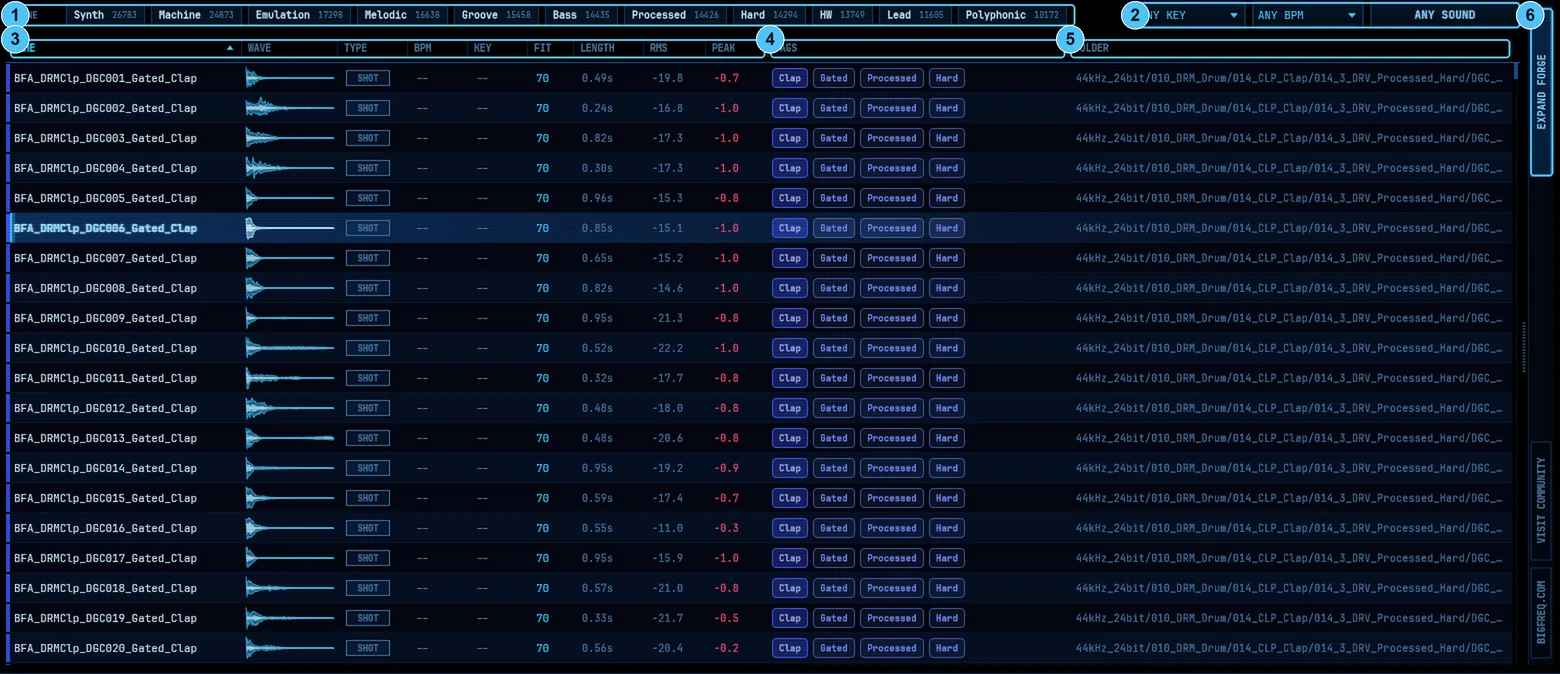
Every sound comes analysed, so you can sort and filter by key, tempo, type and character.

  1. Refine Smart tag chips with counts. One click narrows Clap results to Gated, Processed or Hard.
  2. Key, BPM and sound filters Lock the browser to your track's key and tempo.
  3. Analysed columns Type (shot or loop), BPM, key, fit, length, RMS and peak for every file. FIT scores from 0 to 100 how well a sound suits your project, from its key and tempo.
  4. Tags Every sound tagged by type, character and processing.
  5. Folder See exactly where each file lives.
  6. Expand Forge Open the drum machine panel next to the browser.
Sonic Vault: hear it the way it will sound in your track, with numbered markers
Preview editor

Hear it the way it will sound in your track

Audition every sound in time, in key and at the right level, then edit and drag it out.

  1. Tempo and key Source BPM, target BPM, detected key, pitch shift, gain and length, with host tempo sync.
  2. Edit tools (Pro) Reverse, slice with sensitivity and quantize, extract MIDI from a loop, reset and polarity flip.
  3. Lock and stretch mode (Pro) Lock a sound while you browse, and pick the stretch algorithm.
  4. Filters High-pass and low-pass with 6 dB slopes for quick previews in context.
  5. Waveform Stereo display with beat grid, bar markers and slice points.
  6. Peak and VU meter With true-peak readout and calibration.
  7. Drag to DAW Drop the edited sound straight onto a track.
  8. Tempo Sync, Key Match, Level Match (Pro) Previews follow your session, with key, major/minor and transpose controls.
  9. Transport Play, stop, loop, auto-play on select, and wait for the next bar.
Sonic Vault: slice any loop, right on the hits
Slice mode · Pro

Slice any loop, right on the hits

Press SLICE in the preview editor to cut a loop into pieces, then edit, quantize and play each one.

  1. Transients SLICE cuts on every hit.
  2. Sensitivity SENS sets how many slices the transients give you.
  3. Markers Drag slice markers on the waveform. Double-click or right-click in the marker lane to add or remove one. The 1/16 snap needs a loop with a BPM.
  4. Quantize Move every slice towards the grid with no stretching, from 1/4 to 1/32 plus triplets, at a strength from 0 to 100 %. SLICE starts locked to the grid: QUANT 1/16 at 100 %, with the 1/16 snap on.
  5. Per slice Mute, reverse or pitch any slice, from -12 to +12 semitones, on its right-click menu.
  6. Fades A 1.5 ms fade on every cut, on by default. Turn it off and unedited slices play exactly as the loop.
  7. Groove MIDI Drag out one note per slice from C1, on the hits, at any project tempo when the loop has a BPM. Muted slices are left out.
  8. Slice to Forge Send the slices to the Mini Forge pads, and to Sonic Forge when it is open.
Sonic Vault: build a kit while you browse, with numbered markers
Mini Forge

Build a kit while you browse

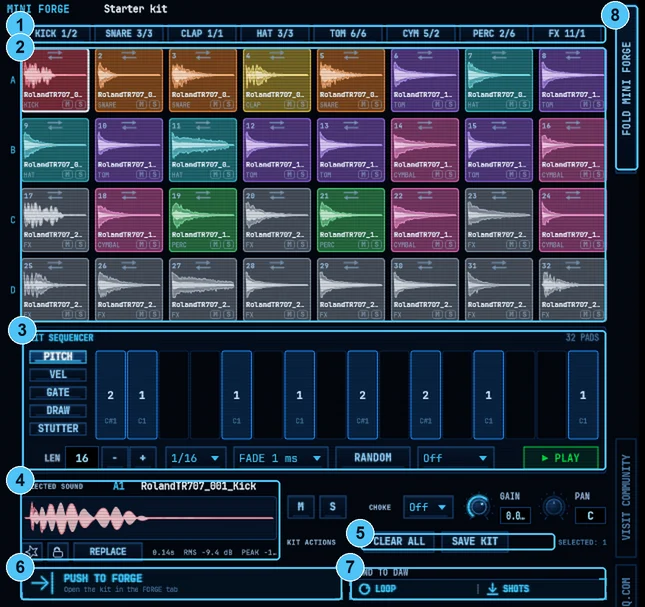
The Mini Forge sits next to the browser, so every sound you like goes straight onto a pad. Turn on SLICE (Pro), then use SLICE TO FORGE to put every slice on the pads.

  1. Kit slots by type See how many kicks, snares, claps, hats, toms, cymbals, percussion and FX the kit holds.
  2. 32 pads Colour-coded by sound type, each with mute and solo.
  3. Kit sequencer Pitch, velocity, gate, draw and stutter lanes, length, rate, fade and randomise.
  4. Selected sound Waveform, mute/solo, choke group, gain and pan per pad.
  5. Kit actions Clear All, and Save Kit Pro
  6. Push to Forge Open the kit in the full Forge tab Pro
  7. Send to DAW Drag the beat as a loop, or send every pad as a separate one-shot.
  8. Fold Collapse the Mini Forge to give the browser full width.
Sonic Vault: the full drum machine, inside the vault, with numbered markers
Forge tab · Pro

The full drum machine, inside the Vault

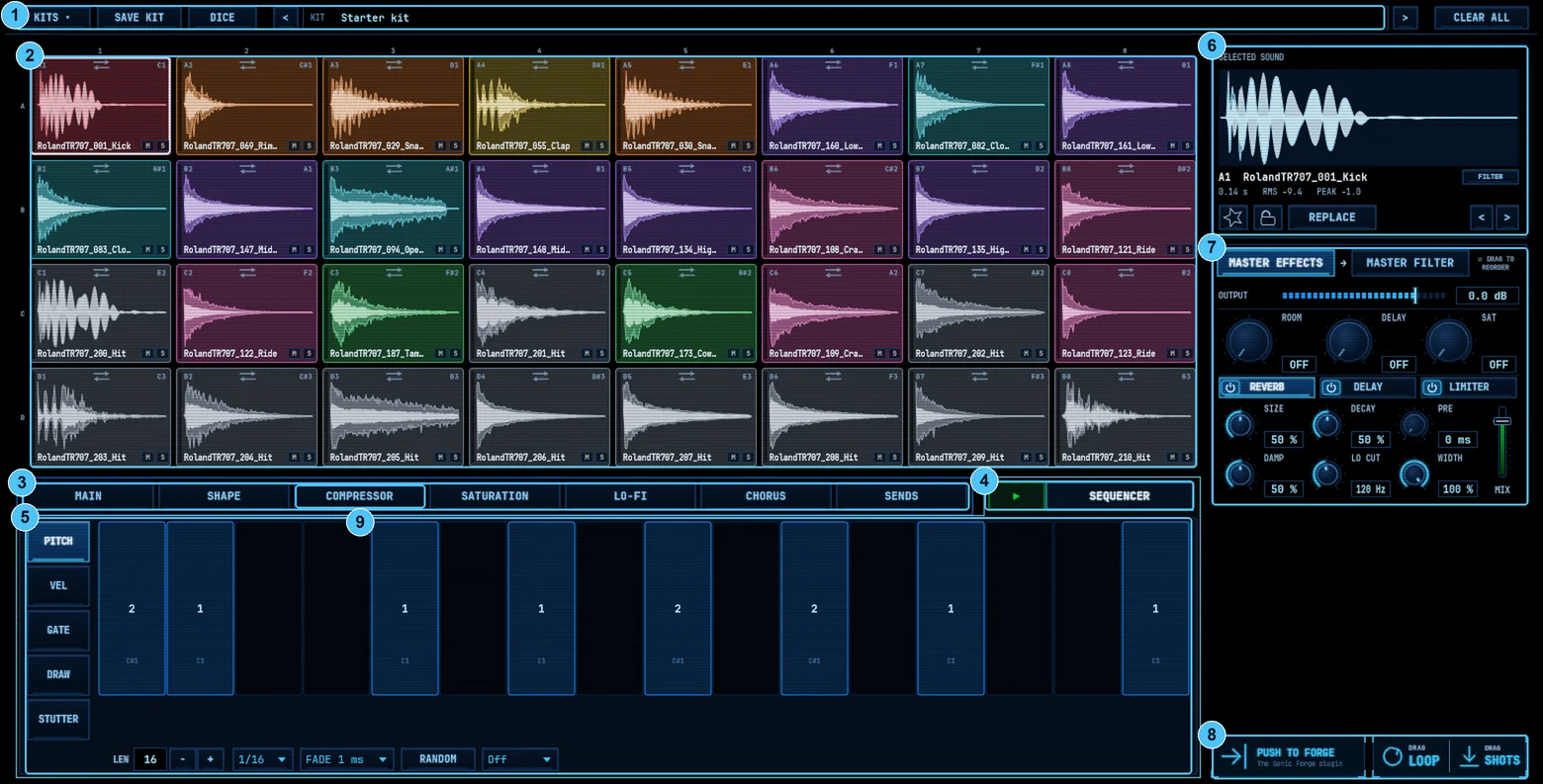
Pro opens the full drum machine inside the Sonic Vault, with sound design on every pad and master effects.

  1. Kits Browse, save, randomise with Dice, and step through kits.
  2. 32 pads With notes, swap arrows and per-pad mute/solo. Here a loop is sliced across all 32 pads.
  3. Per-pad sound design Main, Shape, Compressor, Saturation, Lo-Fi, Chorus and Sends on every pad.
  4. Sequencer With DAW sync.
  5. Step lanes Pitch, velocity, gate, draw and stutter per step.
  6. Selected sound Waveform, favourite, lock, replace, and step through alternatives.
  7. Master effects Room, delay and saturation sends, reverb, delay and limiter, plus a master filter. Drag to reorder.
  8. Push to Forge, Drag Loop, Drag Shots Send the kit to the standalone Sonic Forge, or to your DAW.
  9. Kit effects One Compressor, Lo-Fi and Chorus on the whole kit. Set the target on each of those tabs to KIT or to a single pad.
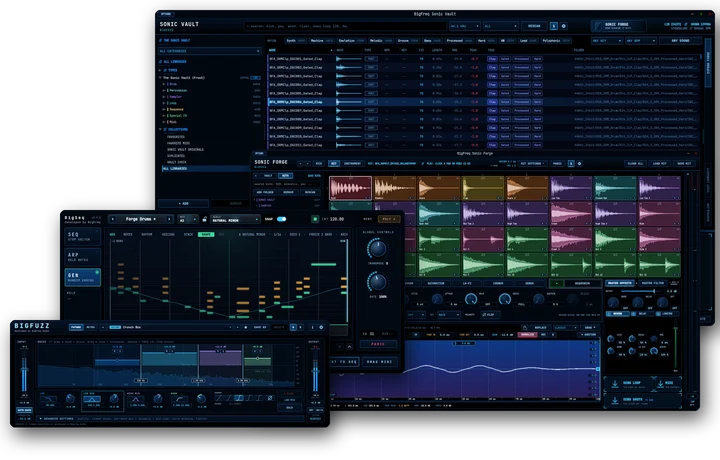
The BigFreq Sonic Suite: Sonic Vault, Sonic Forge, BigSeq and BigFuzz
Better together

The heart of the Sonic Suite

Find sounds in the Vault, build kits in the Forge tab, then push them to the standalone Sonic Forge for multi-output drum and instrument work. BigSeq and BigFuzz round out the family.

Free or Pro

Basic vs Pro

Sonic Vault Basic is free for everyone. Pro unlocks saving kits and the full Forge tab.

FeatureBasic (free)Pro
Browse, search and filter
Preview and play every sound as it is on disk
Your own sample folders
Tempo Sync, Key Match, Level Match and sound edits
Drag to DAW
Mini Forge, 32 pads, pad mixer (mute, solo, choke, gain, pan)
Save Kit
Full Forge tab with per-pad effects and master FX
Starter sample packTrial users keep itIncluded

Pro also adds Collections, Find similar, Search with Sound, gain-staged export, Push to Forge and separate outputs. Basic keeps Favourites.

Pricing and ways to own

Own it today, or own it for €17.99 a month.

Sonic Vault Pro is part of the Sonic Suite. Own the whole Suite for €17.99 a month, yours to keep after 9 payments, or buy outright: Sonic Vault Pro on its own, or the whole Suite for €149.99.

Rent to own

Sonic Suite plan

Sonic Vault Pro comes with every plugin in the Suite.

€17.99/month, yours after 9 payments
  • Sonic Vault Pro, Sonic Forge and BigSeq
  • Yours to keep after 9 payments
  • Cancel anytime
  • One BigFreq licence for every plugin
  • Cancel before payment 9: the plugins go back to the free Sonic Vault Basic tier.
  • Rejoin within 12 months and the payments you made still count toward ownership.
Start the plan
Buy outright

Pay once, own it

€99one timeOne-time payment
  • Everything in the Sonic Vault, Pro unlocked
  • Full Forge tab with per-pad effects
  • Save kits, Push to Forge
Buy Sonic Vault Pro
€149.99one time
  • Sonic Vault Pro, Sonic Forge and BigSeq, yours today
  • One payment, nothing more to pay
  • One BigFreq licence for every plugin
Buy the Sonic Suite

Cancel the plan anytime. Plugins you own stay yours.

Not ready yet? Sonic Vault Basic is free, and Pro comes with a 30-day trial.Prices in EUR. Secure checkout by Moonbase.
At a glance

Specs

Plugin type
Sample manager and browser with a built-in drum machine
Library
139,000+ sounds in the Sonic Vault
Your own libraries
Add any folder
Sample rates
44.1 kHz and 48 kHz
Analysis
Type, BPM, key, length, RMS, peak, tags
Preview
Tempo sync, key match, level match, filters, metering
Drum machine
32 pads, kit sequencer, loop slicing to pads
Updates
New versions in your BigFreq account, with an update badge in the plugin
Formats
VST3, AU (macOS) and standalone
Platforms
Windows 10 and 11 (64-bit), macOS 15 Sequoia or later (Apple Silicon and Intel)
Version
1.0, release planned for 15 January 2027
01 / Download

Download Sonic Vault

Start with Sonic Vault Basic, free forever, or try every Pro feature free for 30 days. Both come through your free BigFreq account: the download link arrives by email, the installers stay in your account, and you join the free BigFreq community.

Windows

VST3
  • Windows 10 and 11, 64-bit
  • Any VST3 host
  • Version 1.0
Available soonAvailable soon

macOS

VST3 · AU · Standalone
  • macOS 15 Sequoia or later, Apple Silicon and Intel
  • Any VST3 or Audio Units host, Logic Pro included
  • Version 1.0
Available soonAvailable soon
02 / Release history

Release notes

What changed in each version: new features, fixes and known issues.

1.0First release
Planned for 15 January 2027
  • NewBrowse the BigFreq Vault (139,000+ sounds) and your own sample folders side by side.
  • NewEvery sound analysed for type, BPM, key, length, RMS, peak and tags, with filters for each.
  • NewPreview with filters and metering; Tempo Sync, Key Match and Level Match in Pro.
  • NewGain structure (Pro): Auto per-type targets or a fixed level from -6 to -24 dBTP.
  • NewSlice loops to pads and build kits in the 32-pad drum machine with its kit sequencer.
  • NewSave kits and send them to Sonic Forge with Push to Forge (Pro).
  • NewVST3, AU (macOS) and standalone for Windows and macOS.
03 / Installation and help

Install and help

Is there a free version?

Yes. Sonic Vault Basic is free. Pro comes with a 30-day trial.

Can I use my own samples?

Yes. Add any folder as a library and browse it next to the Sonic Vault.

How do new sounds arrive?

New sound drops (Sonic Vault drips) start after launch. Until then, updates come as new versions in your BigFreq account, and the plugin shows a badge when one is ready.

What is the difference between the Forge tab and Sonic Forge?

The Forge tab builds kits from one-shots inside the Sonic Vault. Sonic Forge is the standalone drum machine and sampler, with multi-output routing and the full instrument engine.

Rent to own or buy outright?

Own the full Sonic Suite for €17.99 a month. Yours to keep after 9 payments. Cancel anytime. Or own it today for €149.99. Or buy Sonic Vault Pro on its own for €99.

How do I install it?

Run the installer for your system, restart your DAW and rescan plugins if needed. Windows: the VST3 goes to C:\Program Files\Common Files\VST3\BigFreq\ and the standalone app to C:\Program Files\BigFreq\. macOS: VST3 in /Library/Audio/Plug-Ins/VST3, AU in /Library/Audio/Plug-Ins/Components and the standalone app in /Applications/BigFreq.

Reports are stored privately and read only by the BigFreq team. Your email is optional and used only to reply about this report.

Start with Sonic Vault Basic, free

Upgrade to Pro whenever you are ready, try it free for 30 days, or get it inside the Sonic Suite.